

Project Description
[fullwidth background_color=”” background_image=”” background_parallax=”none” enable_mobile=”no” parallax_speed=”0.3″ background_repeat=”no-repeat” background_position=”left top” video_url=”” video_aspect_ratio=”16:9″ video_webm=”” video_mp4=”” video_ogv=”” video_preview_image=”” overlay_color=”” overlay_opacity=”0.5″ video_mute=”yes” video_loop=”yes” fade=”no” border_size=”0px” border_color=”” border_style=”solid” padding_top=”0″ padding_bottom=”20″ padding_left=”0″ padding_right=”0″ hundred_percent=”no” equal_height_columns=”no” hide_on_mobile=”no” menu_anchor=”” class=”” id=””][separator style_type=”none” top_margin=”-45″ bottom_margin=”” sep_color=”” border_size=”” icon=”” icon_circle=”” icon_circle_color=”” width=”” alignment=”center” class=”” id=””]
How to Attract More Customers with Business Listing Categories
When you are setting up your business categories on top sites like Google, Facebook and Yelp, it’s important to focus on your target audience. Just as you do not want to pay to advertise where no one will find you, you also do not want to invest time in selecting business categories that put your business in front of people who are not looking for the products or services you offer.
For this reason, it is important to only select business categories that pertain to your business. Adding non-relevent business categories ultimately creates a bad listing and when consumers waste their time because of a bad listing, your business’s online visibility can be negatively impacted.
Google Best Practices
As stated in Google’s guidelines: Business categories help your customers find accurate, specific results for services of interest. In order to keep your business information accurate and live, make sure you:
- Use as few categories as possible to describe your overall business
- Choose specific categories representative of your main business.
- Do not use categories solely as keywords or to describe business attributes.
- Do not use categories that pertain to other businesses that are nearby or related, such as a business physically contained within your business or an entity that contains your business.
For Chains and Brands:
- Locations of a business must share the one category that best represents the business. If you have multiple types of locations (e.g. sub-brands, multiple departments, or various types of operations such as retail, distribution center, and office), this rule only applies within each of these sub-groups.
Google focuses on providing information that is relevant to its users (your potential customers). Because of this, if you run a tire shop but select “Transportation Services” as another category, Google may not rank you as highly due to your information being too widespread. However, if you had “Tire Shop,” “Automotive Repairs,” and “Maintenance” selected as categories … Google would likely rank you with more relevance because you have closely linked categories that could very likely be searched for by the same group of users.
In essence, you want to ask yourself exactly what it is you do and stick to that. If you don’t offer transportation services (buses, limousines, taxis) and you only repair vehicles … stick to categories that pertain to automotive repair only.
Business Category Tools
A good tool to use if you are having trouble selecting appropriate categories is Mike Blumenthal’s Google Places Category Tool. Simply type your industry into the search box and a list of relevant categories will populate. Both Google+ and Yelp categories are available which can be used on other sites as well.
If you have several good options to choose from, you can use the Google Keyword Tool to decide which one is the most valuable to your business. Enter potential business categories into the Keyword Tool and see which one has the most local searches. Wording may vary from site to site on available business categories so choose the option closest to the keywords with the highest search rate. For instance, “Car Detailing” is a highly searched keyword and “Auto Detailing” is an available Yelp category.
 [/imageframe][/one_half][one_half last=”yes” spacing=”yes” center_content=”no” hide_on_mobile=”no” background_color=”” background_image=”” background_repeat=”no-repeat” background_position=”left top” border_position=”all” border_size=”0px” border_color=”” border_style=”” padding=”” margin_top=”” margin_bottom=”” animation_type=”” animation_direction=”” animation_speed=”0.1″ class=”” id=””][imageframe lightbox=”no” lightbox_image=”” style_type=”none” hover_type=”none” bordercolor=”” bordersize=”0px” borderradius=”0″ stylecolor=”” align=”none” link=”” linktarget=”_self” animation_type=”0″ animation_direction=”down” animation_speed=”0.1″ hide_on_mobile=”no” class=”” id=””]
  [/imageframe][/one_half]
Once you have determined which categories are right for your business, you can update all your listings on top sites in one place…your Master Listing. From your Merchant Centric account you can access your Master Listing from the Your Account menu

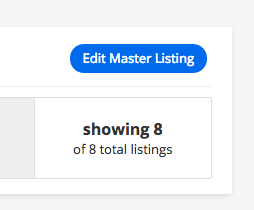
or using the Edit Master Listing button on your Visibility page.
In you Master Listing, go to the Categories section to add or remove business listing categories for each top site.

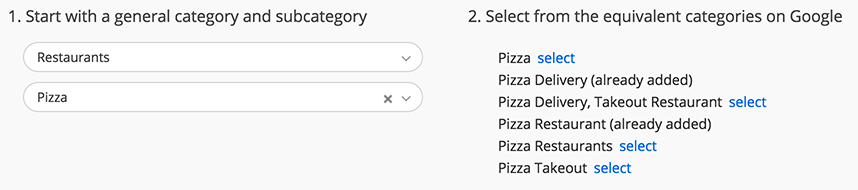
Note that different web sites have different category names, so you cannot always use the same category name for all sites. To help you, we have identified what categories the different sites use for their sub-categories of business. We also have identified all the categories that your competitors in these sub-categories are using, so you can choose the ones that apply and add them.
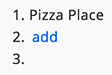
Be sure to remove categories that do not apply by using the blue X next to the category.
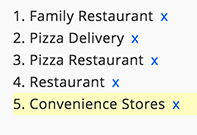
As mentioned above when you add too many irrelevant categories, the listing site may find that your business is seldom selected when presented, and list you lower and lower on their search results.
When you are satisfied with your selections, select Save Master Listing.
This will update the category selection. If you have approved your Master Listing, Merchant Centric will synchronize all the business listings that are connected.


