

Project Description
[fullwidth background_color=”” background_image=”” background_parallax=”none” enable_mobile=”no” parallax_speed=”0.3″ background_repeat=”no-repeat” background_position=”left top” video_url=”” video_aspect_ratio=”16:9″ video_webm=”” video_mp4=”” video_ogv=”” video_preview_image=”” overlay_color=”” overlay_opacity=”0.5″ video_mute=”yes” video_loop=”yes” fade=”no” border_size=”0px” border_color=”” border_style=”solid” padding_top=”0″ padding_bottom=”20″ padding_left=”0″ padding_right=”0″ hundred_percent=”no” equal_height_columns=”no” hide_on_mobile=”no” menu_anchor=”” class=”” id=””][separator style_type=”none” top_margin=”-45″ bottom_margin=”” sep_color=”” border_size=”” icon=”” icon_circle=”” icon_circle_color=”” width=”” alignment=”center” class=”” id=””]
How to Control and Improve Your Online Reputation
The first step in taking control and improving your online reputation is to understand the current state of your business’ online reputation. Then you should take steps to control your business’ listings on top sites, which is vital for you to improve your reputation.
Merchant Centric makes it easy for you to do these steps. A good place to start is the Competition page.

You will see a summary of your reviews and those of selected competitors. You can see the total number of reviews we found for your business on top sites, how many are positive, negative and neutral. You will also see your business’ overall rating at a detailed level because the smallest change in a star-rating can have a big impact on revenue. This is the collective weighting of all the reviews found for your business across the top sites.
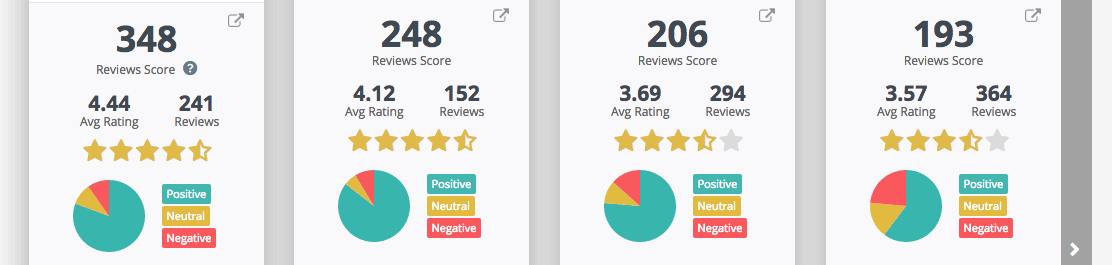
In some cases we have converted an individual site’s rating system to a five star scale so they can all be measured together.
To see more details on the reviews that are forming your online reputation, you can click the Reviews linked panel ( ) under your name.

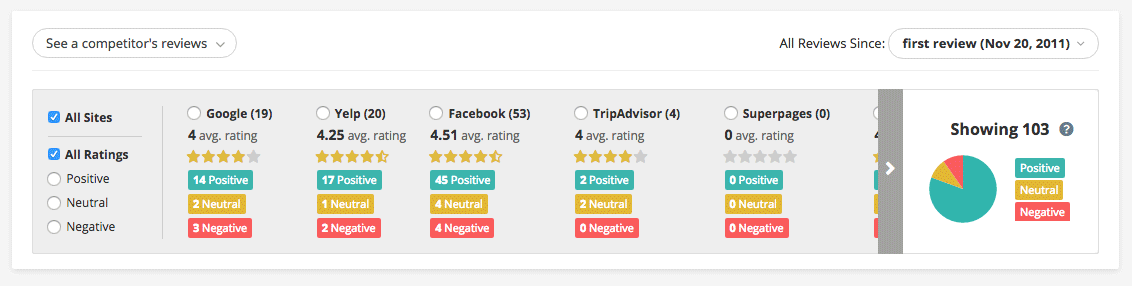
Or go to the Reviews page, using the left navigation. Here on the Reviews page you will see all the reviews found for your business.

You can filter them by site or rating sentiment to display only the reviews you want to read. This information provides you with the current status of your online reputation.
For a more in-depth look on how to manage your online reputation, please see our blog article:
To be able to reply to your reviews through Merchant Centric you must first connect your business listing to Merchant Centric.


