Project Description
[fullwidth background_color=”” background_image=”” background_parallax=”none” enable_mobile=”no” parallax_speed=”0.3″ background_repeat=”no-repeat” background_position=”left top” video_url=”” video_aspect_ratio=”16:9″ video_webm=”” video_mp4=”” video_ogv=”” video_preview_image=”” overlay_color=”” overlay_opacity=”0.5″ video_mute=”yes” video_loop=”yes” fade=”no” border_size=”0px” border_color=”” border_style=”solid” padding_top=”0″ padding_bottom=”20″ padding_left=”0″ padding_right=”0″ hundred_percent=”no” equal_height_columns=”no” hide_on_mobile=”no” menu_anchor=”” class=”” id=””][separator style_type=”none” top_margin=”-45″ bottom_margin=”” sep_color=”” border_size=”” icon=”” icon_circle=”” icon_circle_color=”” width=”” alignment=”center” class=”” id=””]
Using Your Competitive Snapshot
After you have selected competitors to monitor within Merchant Centric, they will display as Your Competitive Snapshot on the Competition Page. This Snapshot provides you with an easy means to see at a glance how your business compares on the components that make up your Marketing Score.

Your business and your competitors’ information is updated daily. You can use the left and right arrows to see all the competitors you have picked.
As you scroll through, see which competitor has the highest Marketing Score.

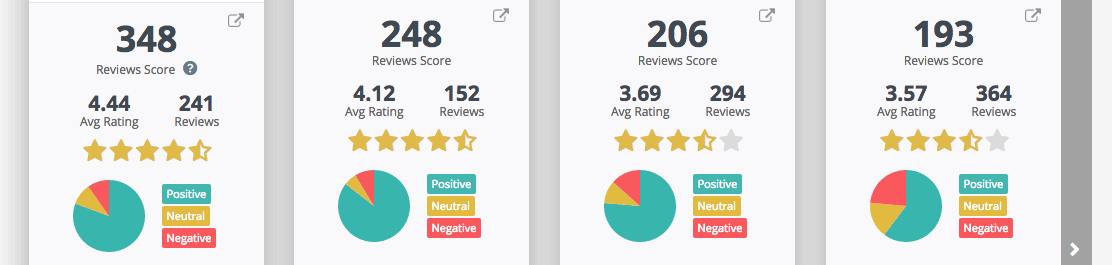
Scan below to see what is driving their Marketing Score. Do they have more reviews and a higher average star-rating…
have they taken steps to ensure their business listings are found on all the top sites…

are their customers visiting their locations, liking and checking–in via social sites…

Are they attracting more customers with promotions?

To see more details on any of your competitors, you can click through using the linked panels ( ). For instance, clicking on a competitors Reviews Score panel…

will take you to the Reviews page, displaying the selected competitor’s reviews. This makes it easy for you to see what their customers are saying about them, positive and negative.

Going back to Your Competitive Snapshot, you can click on the Visibility Score panel to see your competitors’ business listing status on top sites.

In addition to the status of your competitors’ listings, you can see what categories they use, how many photos and videos they use and more… you can also view their actual listing on that site.

The Competitive Snapshot provides you with an easy and valuable means to stay updated on how you are doing relative to your chosen competitors.